We run it A to Z.
You approve and follow along.
Streamers, overlay, launch, monitoring and report. You give us the brief and the budget, we run the campaign on Twitch, YouTube and Kick, and you watch it happen in your own dashboard login.
- 01Overlay placedVerified
- 08Visible on streamVerified
- 11Animation runningVerified
- 14Overlay placedVerified
- 21Animation runningVerified
- 25Overlay placedVerified
Five things on your side. The rest is ours.
The right start if livestream is new to you. You stay in control of the brand and the streamer list, we do the work in between.
- Share the brief, the market and the budget
- Approve the streamer list, or remove anyone on it
- Approve the overlay before launch
- Follow the campaign in your own dashboard login
- Read the end report
- Pick the streamers in the Streamer Explorer
- Design the animated overlay in your brand
- Set up the !brand chat command and an optional poll
- Brief the streamers
- Set it up in OBS on every channel
- Check every channel on air
- Record a clip of every ad play
- Write the end report
- Refund undelivered views pro rata
Seven steps. One contact.
Each step is marked with who does it. Where it says both, you get a say before we move on.
- 01You
Brief and budget
Tell us the product, the market and the goal. We agree the number of views before launch.
- 02Both
Streamer selection
We pick the streamers from the Streamer Explorer. You can approve the list and remove anyone before it goes out.
- 03Beta Ads
Custom overlay
We design the animated overlay in your brand, sized for a corner of the stream. Viewers type !brand in chat to get your link, and you can add a poll.
- 04Beta Ads
Briefing and setup
We brief every streamer and set the overlay up in OBS with them.
- 05Beta Ads
Setup verification
Every channel is checked on air: overlay placed, visible on stream, animation running.
- 06Both
Live monitoring
Every ad play leaves a recorded clip. You follow views, clicks and CTR per streamer and per stream in your own dashboard login.
- 07Beta Ads
End report
Delivery, clicks, chat tracking and replay reach when the campaign ends. Undelivered views are refunded pro rata.
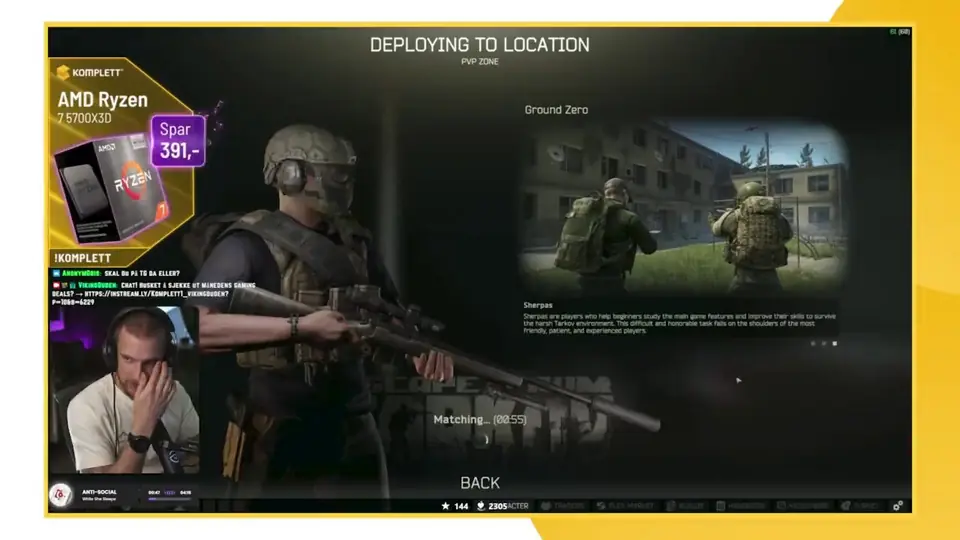
Made in your brand. Sized for the corner.
- Animated overlay
- Designed by us in your brand, sized for a corner of the stream so it sits next to the game, not on top of it.
- Chat command
- Viewers type !brand in chat and get your link, while the stream is on.
- Optional poll
- Ask the viewers a question in the stream and read the answers in the report.
Your own login while it runs. A report when it ends.
Views, clicks and CTR per streamer and per stream, with a recorded clip of every ad play. The end report adds chat tracking and replay reach, as a PDF you can forward.
- Setup verification
- Chat tracking
- Replay reach
- PDF report
!s25link requested, answeredIntentChat tracking in the end report. Example UI.
You pay for views. Not for promises.
Priced per 1,000 animation views, with the number of views agreed before launch. See how livestream pricing works on the pricing page.
- One view
- One fully played run of the animation on a live stream on Twitch, YouTube or Kick.
- Undelivered views
- Refunded pro rata. Clicks and CTR are reported, not guaranteed.
- Contract and invoice
- BETA AGENCY AS, org.nr 933 303 136.
Campaigns we ran. The numbers are on the case pages.
All case studies- SamsungGalaxy S25 Ultra and Z Fold7800,185 completed live views, 1.35M+ with VOD, 71 streamer slotsRead
- SamsungGalaxy Z Fold7300,054 completed live views, 558,257+ VOD views, 28 streamersRead
- NKIQuiz campaign220,003 completed views, 1,595 verified clicks, 19 streamersRead
- ShureMV6 microphone182,554 completed views, 2,378 verified clicks, one creatorRead
- KomplettMånedens Gaming Deal151,278 display views, 1,768 verified clicks, 34 streamersRead
Ask us for the full report behind any of them, or to talk to a recent client.
Questions about managed campaigns
What does a managed campaign cost?
Managed campaigns are priced per 1,000 animation views, and campaigns start from 100,000 NOK. We agree the number of views before launch.
What counts as a view?
One view is one fully played run of your animation on a live stream on Twitch, YouTube or Kick. Views are counted by the campaign platform per stream.
What if the campaign delivers fewer views than agreed?
You pay for the views in your agreement. If the campaign delivers fewer, we refund the undelivered share pro rata. Clicks and CTR are reported, not guaranteed.
Can we choose the streamers?
We pick them from the Streamer Explorer, and you can approve the list and remove anyone on it before launch.
Do we need to make the creative?
No. We design the animated overlay in your brand, sized for a corner of the stream, plus the chat command and an optional poll.
How do we know the ad actually ran?
Every channel is checked on air, and every ad play leaves a recorded clip you can look at. You follow views, clicks and CTR in your own dashboard login.
What is in the end report?
Delivery, clicks, chat tracking and replay reach, per streamer and per stream, as a report you can forward.
We are an agency. Can we start managed?
Yes. Many agencies run one managed campaign first, then move to their own self-serve login for the next ones.
Run your first campaign with us.
A 30 minute call with Andreas about your product, market and budget.
Agency running campaigns for several clients? See self-serve.